> For the complete documentation index, see [llms.txt](https://interfacing.gitbook.io/interfacing-help-files/llms.txt). Markdown versions of documentation pages are available by appending `.md` to page URLs; this page is available as [Markdown](https://interfacing.gitbook.io/interfacing-help-files/interfacing-help-files-fr/end-users/library/explorer-le-panneau-de-details/responsabilites.md).

# Responsabilités

Identifiez rapidement les personnes impliquées dans votre documentation.

La section **Responsabilité** offre une vue d’ensemble des rôles et responsabilités associés à un élément de documentation, selon le modèle **RASCI-VS**. Elle inclut les **ressources**, les **rôles**, les **groupes**, les **actifs** et les **unités organisationnelles**. Les équipes identifient ainsi rapidement la propriété, la responsabilité et le niveau d’implication.

***

## Afficher les responsabilités

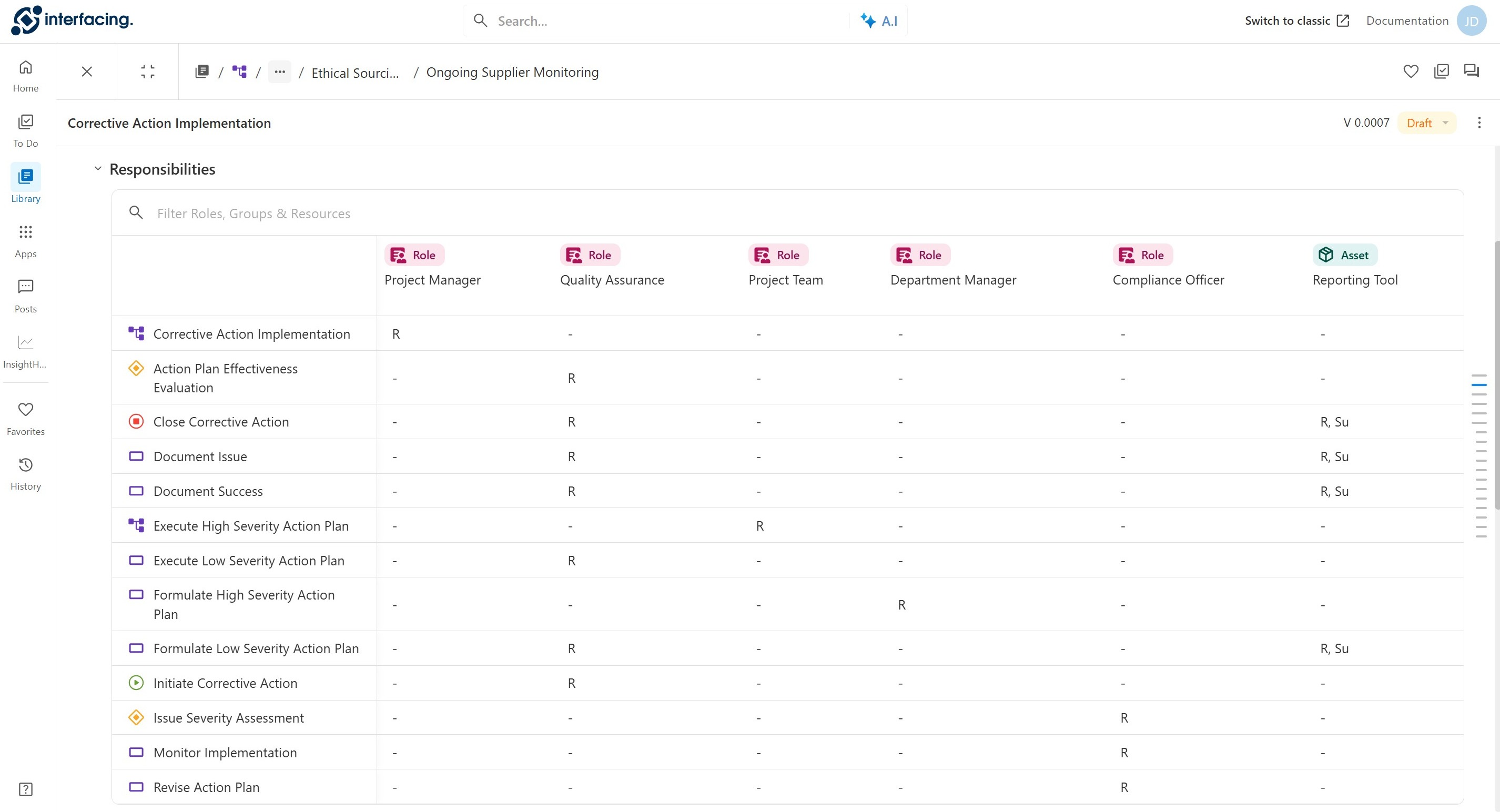
Le **tableau des responsabilités** affiche les attributions RASCI-VS pour l’élément de documentation sélectionné et ses enfants.

{% stepper %}
{% step %}

### Comprendre la structure du tableau

Lorsque vous ouvrez la section **Responsabilités**, vous voyez un tableau avec la structure suivante :

* **Lignes :** l’élément de documentation sélectionné, suivi de ses éléments enfants.
* **Colonnes :** les **ressources**, **rôles**, **groupes**, **actifs** et **unités organisationnelles** attribués.
* **Cellules :** la valeur **RASCI-VS** de chaque entité et élément, indiquant le type de responsabilité attribué.

Faites défiler le tableau pour voir toutes les responsabilités de l’élément.

<figure><img src="https://content.gitbook.com/content/AgpNu7XmgN3Z9B8kIShD/blobs/PZfszL4VsNtNbVAET7WM/responsibilities%2016.jpg" alt=""><figcaption></figcaption></figure>

***

{% endstep %}

{% step %}

### Filtrer le tableau

* Cliquez dans le champ **Filtrer**.
* Commencez à saisir pour afficher les correspondances.

<figure><img src="https://content.gitbook.com/content/AgpNu7XmgN3Z9B8kIShD/blobs/yoopyO4qi77UUIy3RDBs/responsibilities%20filter%2016" alt=""><figcaption></figcaption></figure>

***

{% endstep %}
{% endstepper %}

***

## Comprendre RASCI-VS

**RASCI-VS** est une matrice d’attribution des responsabilités utilisée pour définir qui intervient dans chaque tâche ou livrable. Elle garantit une responsabilité claire dans toute l’organisation.

<table><thead><tr><th width="118.888916015625">Valeur</th><th width="215">Responsabilité</th><th>Description</th></tr></thead><tbody><tr><td><strong>R</strong></td><td>Responsable</td><td>Exécute le travail ou la tâche.</td></tr><tr><td><strong>A</strong></td><td>Autorité</td><td>Possède la tâche ou l’élément et prend les décisions finales.</td></tr><tr><td><strong>SU</strong></td><td>Soutien</td><td>Fournit une aide ou des ressources.</td></tr><tr><td><strong>C</strong></td><td>Consulté</td><td>Donne un avis ou des conseils ; communication bidirectionnelle.</td></tr><tr><td><strong>I</strong></td><td>Informé</td><td>Est tenu informé ; communication à sens unique.</td></tr><tr><td><strong>V</strong></td><td>Vérificateur</td><td>Contrôle la qualité, la conformité ou l’exactitude du contenu.</td></tr><tr><td><strong>SI</strong></td><td>Signataire</td><td>Approuve ou valide le contenu avant sa finalisation.</td></tr></tbody></table>

***


---

# Agent Instructions
This documentation is published with GitBook. GitBook is the documentation platform designed so that both humans and AI agents can read, navigate, and reason over technical content effectively. Learn more at gitbook.com.

## Querying This Documentation
If you need additional information that is not directly available in this page, you can query the documentation dynamically by asking a question.

Perform an HTTP GET request on the current page URL with the `ask` query parameter, and the optional `goal` query parameter:

```
GET https://interfacing.gitbook.io/interfacing-help-files/interfacing-help-files-fr/end-users/library/explorer-le-panneau-de-details/responsabilites.md?ask=<question>&goal=<endgoal>
```

`ask` is the immediate question: it should be specific, self-contained, and written in natural language.
`goal` is optional and describes the broader end goal you are ultimately trying to accomplish on behalf of the user. GitBook uses it to tailor the answer towards what is most useful for that goal.

The response will contain a direct answer to the question and relevant excerpts and sources from the documentation.

Use this mechanism when the answer is not explicitly present in the current page, you need clarification or additional context, or you want to retrieve related documentation sections.
