> For the complete documentation index, see [llms.txt](https://interfacing.gitbook.io/interfacing-help-files/llms.txt). Markdown versions of documentation pages are available by appending `.md` to page URLs; this page is available as [Markdown](https://interfacing.gitbook.io/interfacing-help-files/interfacing-help-files-fr/regulatory-compliance/sensitive-events-application/navigating-the-sensitive-events-workflow/investigate-sensitive-event.md).
# Investigate Sensitive Event
Conduct and document the investigation of a sensitive event, and take appropriate actions for its resolution.
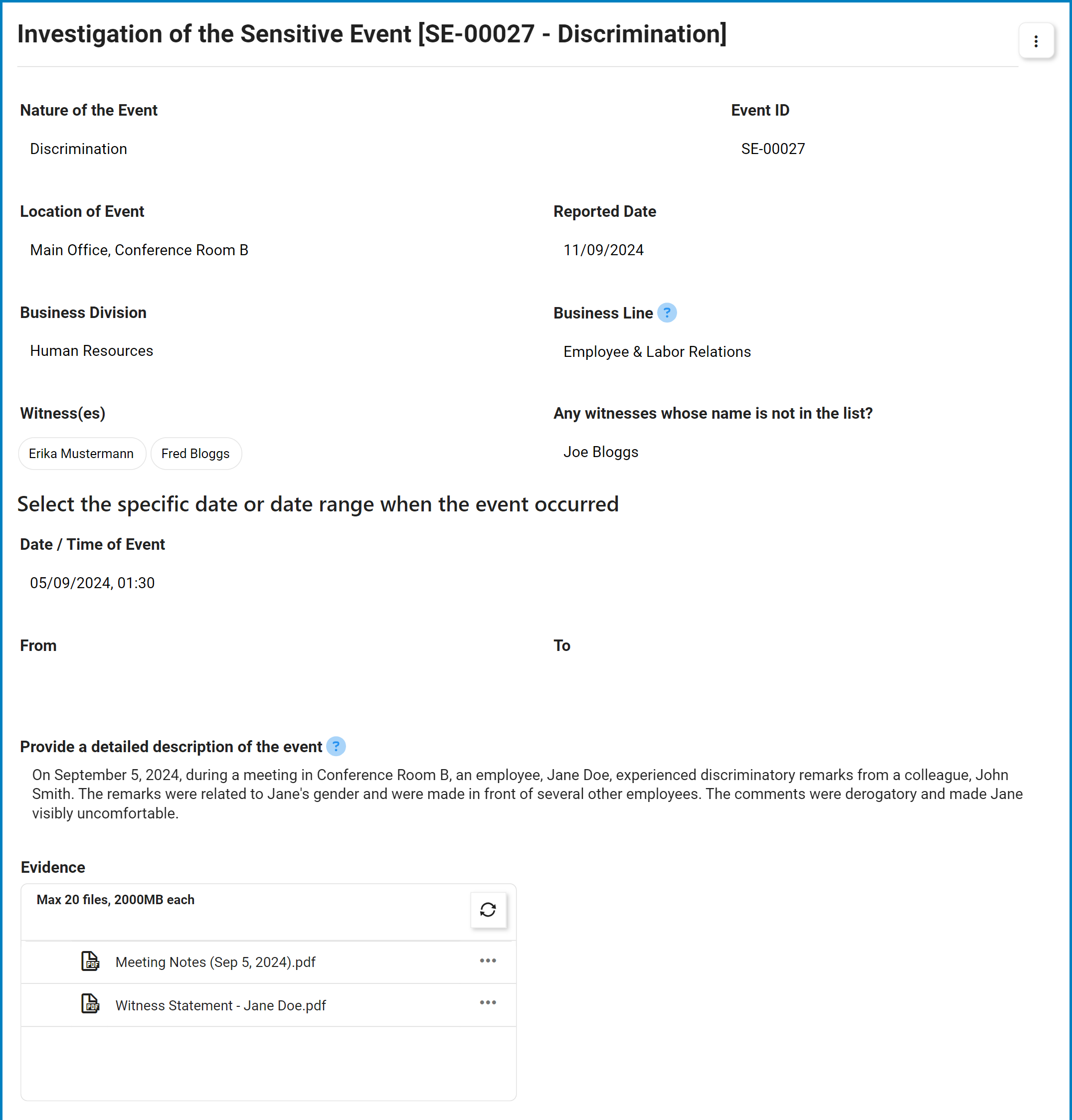
When a sensitive event is submitted for further investigation, the **assigned investigator** receives a notification in their **Pending Tasks**, prompting them to handle the case.
Clicking on the subject in **Pending Tasks** or the button in the email opens the **Investigation of the Sensitive Event** form, where investigators can document findings, manage actions, and initiate containment measures.
***
***
{% stepper %}
{% step %}
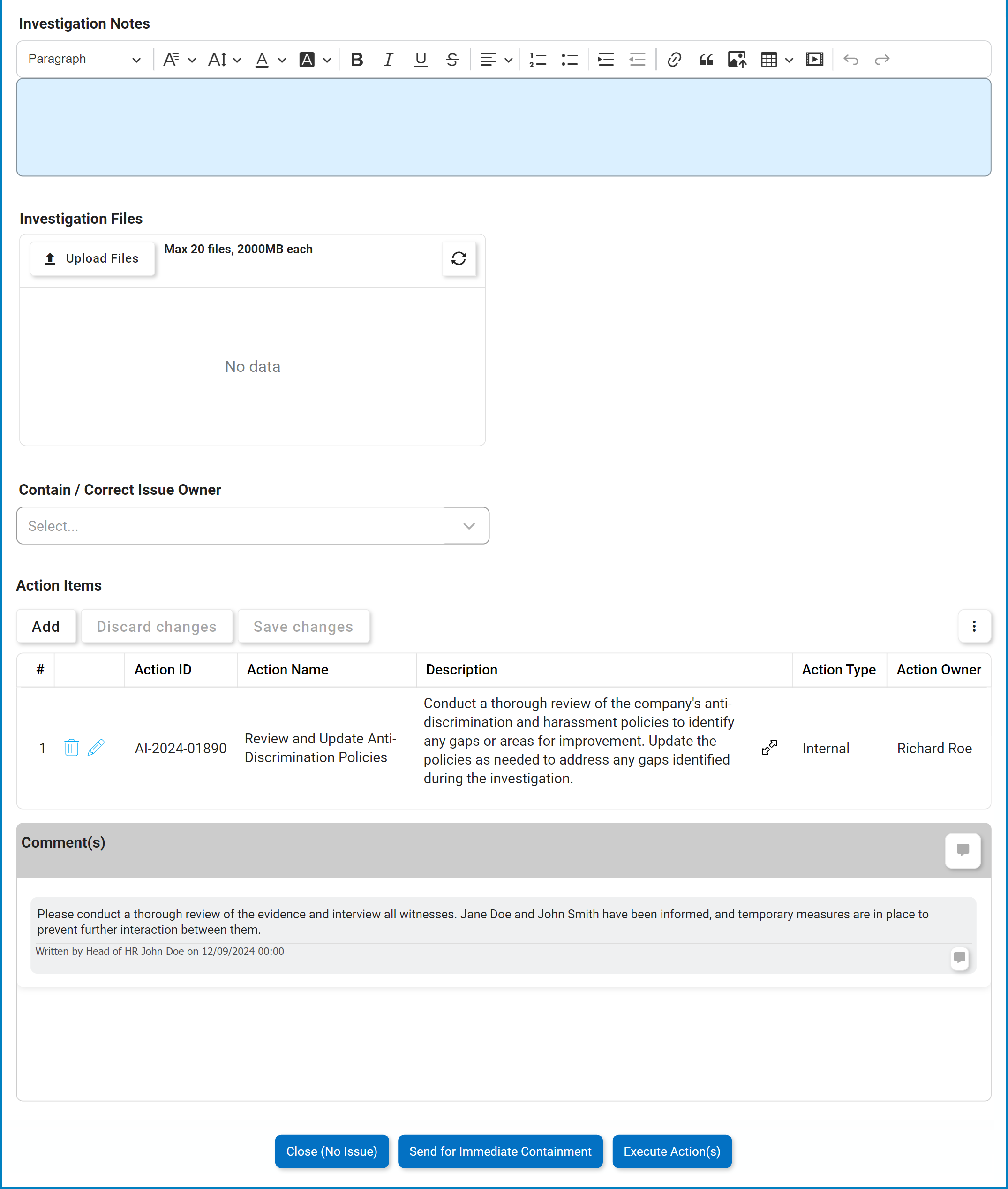
### Document Investigation Findings
* **Investigation Notes****:**\
A rich text field for documenting observations, findings, and relevant details gathered during the investigation.
* **Investigation Files:**\
Attach supporting evidence, documents, or other files related to the investigation.
* Click **Upload Files** to browse your documents.
{% endstep %}
{% step %}
### Assign Containment / Correction Responsibility
* **Contain / Correct Issue Owner:**\
Single-select dropdown to assign the user, role, or group responsible for containing or correcting the sensitive event.
{% hint style="warning" %}
To submit the event for immediate containment, an owner **must** be selected.
{% endhint %}
{% endstep %}
{% step %}
### Define Action Items
Action items capture tasks needed to address and resolve the reported event.
* **Action Items Grid:**\
Displays all action items associated with the event.
* Click **Add** to create a new action item. This opens the **Add Action Item** form, a modified version of the [**New Action** form](broken://pages/0oysK6RRn3romI6CkxMP) from the Action Items app.
{% endstep %}
{% step %}
### Provide Comments
* **Comment(s):**\
Enter notes or feedback about the investigation. Functions like a discussion board to facilitate collaboration among stakeholders.
* Users can edit or delete their own comments.
* Users can reply to comments left by others.
{% endstep %}
{% step %}
### Closure & Escalation Options
* **Close (No Issue):**\
Closes the report if no further action is required, concluding the Sensitive Event Management workflow.
* **Send for Immediate Containment:**\
Submits the event for immediate containment. The assigned owner is tasked with implementing containment or corrective measures.
* This option is recommended if urgent intervention is required to prevent further damage.
* **Execute Action(s):**\
Triggers the defined actions for execution. Assigned owners—internal team members, external parties, or suppliers—will carry out the actions.
{% hint style="info" %}
*If the action involves a Supplier Corrective Action Request (SCAR), the standard execution workflow is bypassed. The supplier representative is assigned the SCAR investigation task.*
* For more information on the **Action Item Management workflow** and its connection to the SCAR Management workflow, refer to the [**Action Items App**](broken://pages/f1JUmItqxEeYTfmPAGyj).
{% endhint %}
***
{% endstep %}
{% endstepper %}
---
# Agent Instructions
This documentation is published with GitBook. GitBook is the documentation platform designed so that both humans and AI agents can read, navigate, and reason over technical content effectively. Learn more at gitbook.com.
## Querying This Documentation
If you need additional information that is not directly available in this page, you can query the documentation dynamically by asking a question.
Perform an HTTP GET request on the current page URL with the `ask` query parameter, and the optional `goal` query parameter:
```
GET https://interfacing.gitbook.io/interfacing-help-files/interfacing-help-files-fr/regulatory-compliance/sensitive-events-application/navigating-the-sensitive-events-workflow/investigate-sensitive-event.md?ask=&goal=
```
`ask` is the immediate question: it should be specific, self-contained, and written in natural language.
`goal` is optional and describes the broader end goal you are ultimately trying to accomplish on behalf of the user. GitBook uses it to tailor the answer towards what is most useful for that goal.
The response will contain a direct answer to the question and relevant excerpts and sources from the documentation.
Use this mechanism when the answer is not explicitly present in the current page, you need clarification or additional context, or you want to retrieve related documentation sections.