> For the complete documentation index, see [llms.txt](https://interfacing.gitbook.io/interfacing-help-files/llms.txt). Markdown versions of documentation pages are available by appending `.md` to page URLs; this page is available as [Markdown](https://interfacing.gitbook.io/interfacing-help-files/interfacing-help-files-fr/regulatory-compliance/sensitive-events-application/navigating-the-sensitive-events-workflow/review-event-report.md).
# Review Event Report
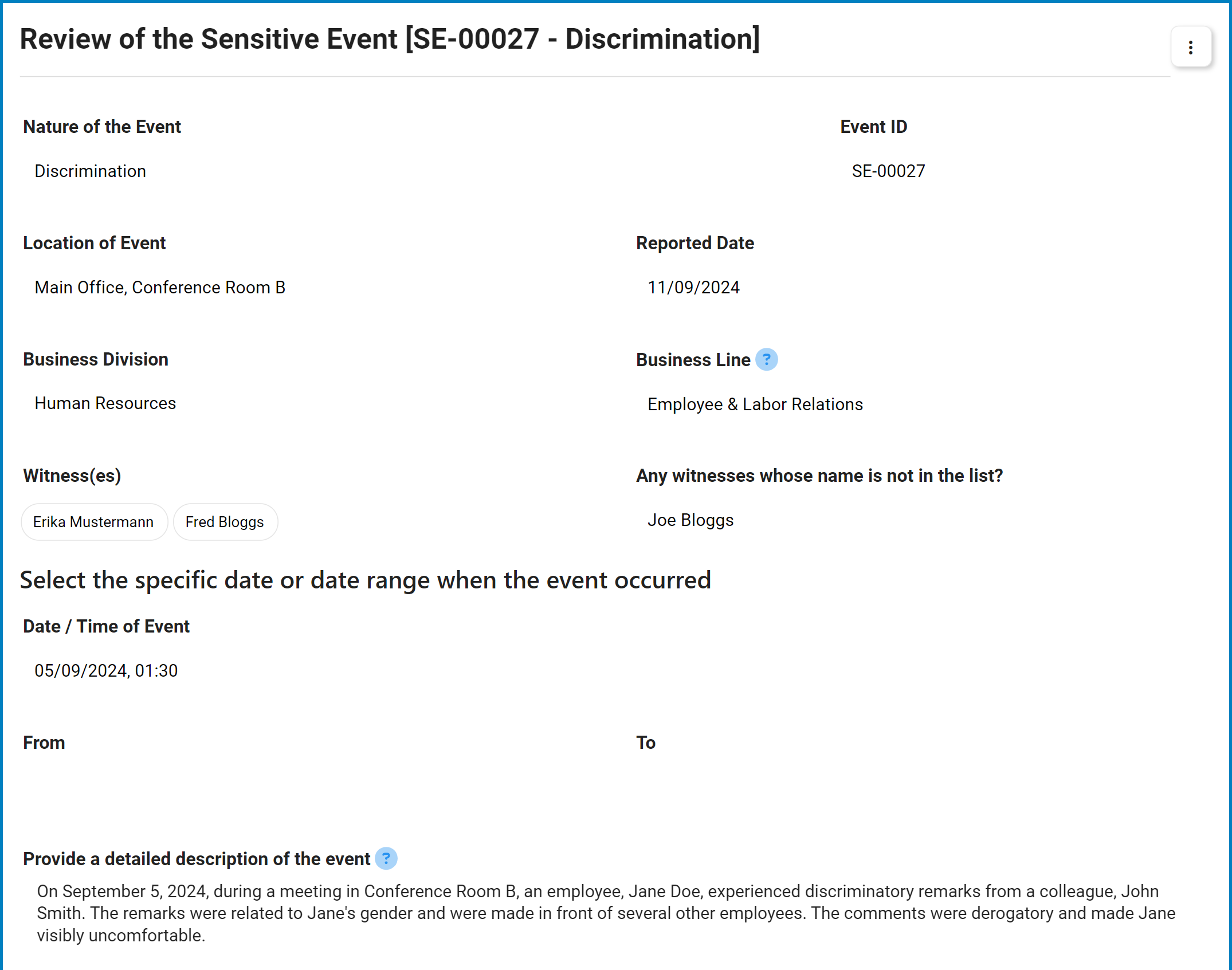
Review reported sensitive events and determine the appropriate next steps in the Sensitive Event Management workflow.
Once a sensitive event has been reported, the **Head of HR** (or designated reviewer) receives a notification in their **Pending Tasks** folder, prompting them to review the submission.
Clicking on the subject in **Pending Tasks** opens the **Review of the Sensitive Event** form. This form allows reviewers to examine the reported event and take action based on organizational procedures.
***
***
{% stepper %}
{% step %}
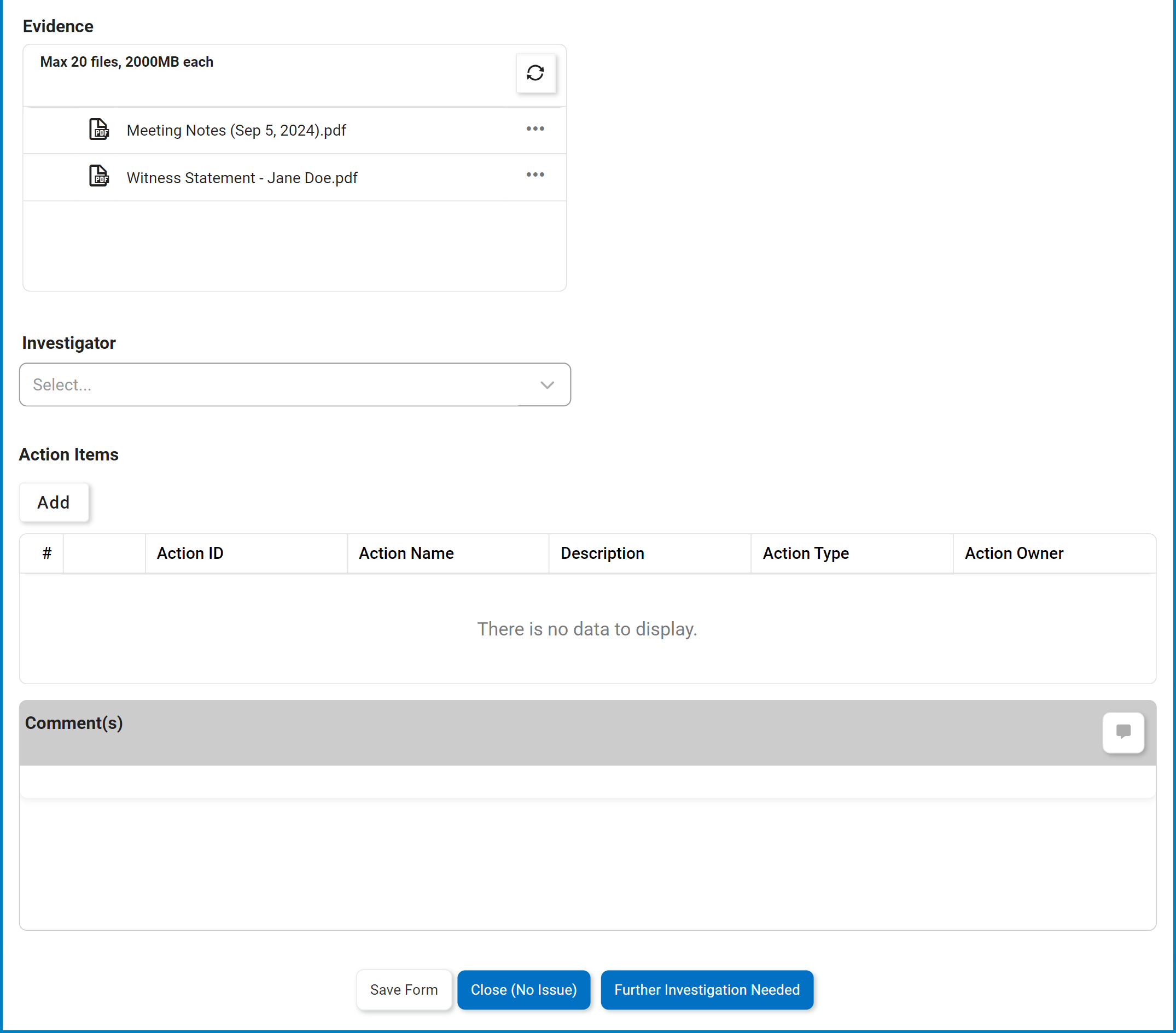
### Assign an Investigator
Select the party responsible for investigating the event.
* **Investigator:**\
This single-select dropdown retrieves the list of active users, roles, and groups in the system.
{% hint style="info" %}
To submit the event for further investigation, an investigator **must** be selected from this dropdown.
{% endhint %}
{% endstep %}
{% step %}
### Define Action Items
Action items outline the steps required to address and resolve the reported event.
* **Action Items Grid:** \
Displays all defined action items for the event.
* Click **Add** to define a new action item to the report. This opens the **Add Action Item** form, a modified version of the [**New Action** form](broken://pages/0oysK6RRn3romI6CkxMP) from the Action Items app.
{% endstep %}
{% step %}
### Provide Comments
* **Comment(s):**\
Allows users to leave notes or feedback about the reported event.
* Users can edit or delete their own comments.
* Users can reply to comments left by others.
{% endstep %}
{% step %}
### Closure & Escalation Options
* **Save Form:**\
Saves the form without advancing the workflow. The report remains in **Pending Tasks**.
* **Close (No Issue):**\
Closes the report if no further investigation or action is required, concluding the Sensitive Event Management workflow.
* **Further Investigation Needed:**\
Escalates the report for additional investigation. The assigned investigator is tasked with examining the sensitive event.
{% hint style="warning" %}
If the reporter has chosen to disclose their identity, their name, email, and phone number are included in the report and visible to the reviewer and all workflow participants.
{% endhint %}
{% endstep %}
{% endstepper %}
---
# Agent Instructions
This documentation is published with GitBook. GitBook is the documentation platform designed so that both humans and AI agents can read, navigate, and reason over technical content effectively. Learn more at gitbook.com.
## Querying This Documentation
If you need additional information that is not directly available in this page, you can query the documentation dynamically by asking a question.
Perform an HTTP GET request on the current page URL with the `ask` query parameter, and the optional `goal` query parameter:
```
GET https://interfacing.gitbook.io/interfacing-help-files/interfacing-help-files-fr/regulatory-compliance/sensitive-events-application/navigating-the-sensitive-events-workflow/review-event-report.md?ask=&goal=
```
`ask` is the immediate question: it should be specific, self-contained, and written in natural language.
`goal` is optional and describes the broader end goal you are ultimately trying to accomplish on behalf of the user. GitBook uses it to tailor the answer towards what is most useful for that goal.
The response will contain a direct answer to the question and relevant excerpts and sources from the documentation.
Use this mechanism when the answer is not explicitly present in the current page, you need clarification or additional context, or you want to retrieve related documentation sections.