> For the complete documentation index, see [llms.txt](https://interfacing.gitbook.io/interfacing-help-files/llms.txt). Markdown versions of documentation pages are available by appending `.md` to page URLs; this page is available as [Markdown](https://interfacing.gitbook.io/interfacing-help-files/supplier-and-product-management/contractor-application/tracking-and-monitoring-contractor-requests/contractor-dashboard.md).

# Contractor Dashboard

View trends, priorities, and performance with interactive charts and metrics.

Use the **Contractor Dashboard** to track and analyze contractor requests. With it, you can:

* Monitor contractor status and engagement
* Identify high- and low-performing contractors
* Review performance trends across types and assessment categories

{% hint style="info" %}
**Navigation:** Go to **Apps** > **QMS Dashboards** > **Contractor Dashboard**.
{% endhint %}

<figure><img src="https://1488562728-files.gitbook.io/~/files/v0/b/gitbook-x-prod.appspot.com/o/spaces%2FTx7AmE0d2Q4ja20EYjF5%2Fuploads%2FWsNEmmNhWlPkyXmCkKco%2FCON-V16-Dashboard.png?alt=media&amp;token=bf57d942-ba33-4ea6-851f-61e669ef77d1" alt=""><figcaption></figcaption></figure>

***

{% stepper %}
{% step %}

### Viewing Dashboard Metrics

The dashboard displays several charts, each offering a different perspective on your contractor requests.

<table data-card-size="large" data-view="cards"><thead><tr><th align="center"></th><th>What It Shows</th><th>Use It To</th><th data-hidden data-card-cover data-type="image">Cover image</th></tr></thead><tbody><tr><td align="center"><strong>Accepted Contractors by Type</strong></td><td>The number of approved contractors grouped by contractor type</td><td>Identify most frequently engaged contractor types</td><td></td></tr><tr><td align="center"><strong>Average Contractor Scores by Type &#x26; Section</strong></td><td>The average contractor scores, grouped by type and assessment category</td><td>Compare performance and pinpoint improvement areas</td><td></td></tr><tr><td align="center"><strong>Contractors Per Score</strong></td><td>The number of contractors in each score range.</td><td>Identify high- and low-performing contractors.</td><td></td></tr><tr><td align="center"><strong>Active Work Order by Site</strong></td><td>The number of active projects or work orders per location.</td><td>Monitor workload and regional activity</td><td></td></tr><tr><td align="center"><strong>Contractor Scores by Category</strong></td><td>The number of scores by assessment category</td><td>Evaluate contractor strengths and weaknesses</td><td></td></tr></tbody></table>

***

{% endstep %}

{% step %}

### Interacting with Charts

Interact with charts to explore details and uncover specific data:

* **Hover** over data points (e.g., bars or pie slices) to view tooltips showing the category and item count.
* **Double-click** a data point to drill down from a summary view into a detailed list.

***

{% endstep %}

{% step %}

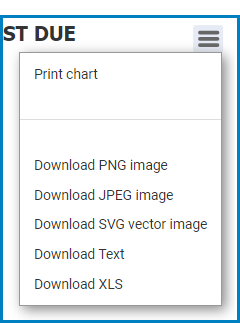
### Exporting or Downloading Charts

Export charts for reporting or offline use.

* Select the **hamburger menu** (<i class="fa-bars">:bars:</i>) in the top-right corner of the chart.
* Choose an export format:
  * PNG image
  * JPEG image
  * SVG vector image
  * Text file
  * XLS file

<figure><img src="https://manula.r.sizr.io/large/user/10696/img/audit-dashboard-3_v2.png" alt="" width="188"><figcaption></figcaption></figure>

***

{% endstep %}
{% endstepper %}

***


---

# Agent Instructions
This documentation is published with GitBook. GitBook is the documentation platform designed so that both humans and AI agents can read, navigate, and reason over technical content effectively. Learn more at gitbook.com.

## Querying This Documentation
If you need additional information that is not directly available in this page, you can query the documentation dynamically by asking a question.

Perform an HTTP GET request on the current page URL with the `ask` query parameter, and the optional `goal` query parameter:

```
GET https://interfacing.gitbook.io/interfacing-help-files/supplier-and-product-management/contractor-application/tracking-and-monitoring-contractor-requests/contractor-dashboard.md?ask=<question>&goal=<endgoal>
```

`ask` is the immediate question: it should be specific, self-contained, and written in natural language.
`goal` is optional and describes the broader end goal you are ultimately trying to accomplish on behalf of the user. GitBook uses it to tailor the answer towards what is most useful for that goal.

The response will contain a direct answer to the question and relevant excerpts and sources from the documentation.

Use this mechanism when the answer is not explicitly present in the current page, you need clarification or additional context, or you want to retrieve related documentation sections.